The last change.
All in one glance.
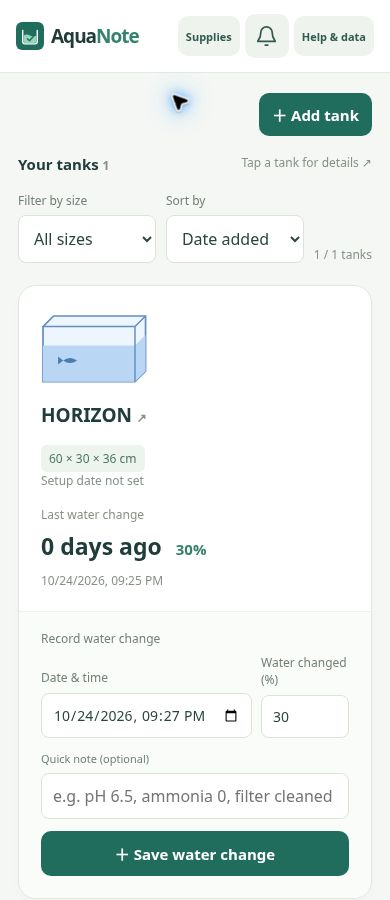
See when and how much you changed before opening each tank.
 AquaNote
LESS TO REMEMBER. MORE TO ENJOY.
See when and how much you changed, tank by tank.
Log the next change right from your tank list.
Less remembering. More enjoying your aquarium.
Android release in preparation · iOS in development
SIMPLE BY DESIGN
A glance at the last change. A quick record of the next. Details when you need them.
See when and how much you changed before opening each tank.
The time defaults to now. Enter the percentage and add a note only if you want to.
Switch to a focused view of the photo, name and last water change. No photo? Keep your chosen tank color.
Photos are resized and stored on your deviceLook back at dates, percentages and quick notes for water tests or maintenance.
Free-form notes · no automatic water quality assessmentChoose an interval and time. The bell lists tanks that have reached their configured date.
Device notification permission is requiredNo account needed. Export your records, including photos, and restore them on another device.
No automatic sync · export before changing phonesMADE FOR YOUR EVERYDAY ROUTINE
More tanks can mean more dates to remember. AquaNote brings your last change, quick recording and history together in a few straightforward steps.
The last date and percentage for each tank, in one list. Dimensions and colors help you tell tanks apart.
Choose a time and percentage, then save. The time defaults to now. Add a quick water quality or maintenance note if you like.
Tap a tank to see its profile and water change history. Keep setup dates, plants and livestock in your notes.
TRY A LITTLE WATER CHANGE
Try the sample form: change the percentage, add an optional note and press the record button.
Website demo only. Your input is not stored or sent.
JUST ENOUGH, WHEN YOU NEED IT
Choose your own interval and time. The bell lists tanks that have reached their configured water change date.
Filter by dimensions and sort by width or volume. Eight tank colors help you tell them apart.
Export a JSON backup and restore it later. Take your records with you when you switch phones.
The planned Android release includes free water change records, history, reminders and backups, with a banner below the tank list. An ad removal purchase is in preparation and is not available for sale yet.
Tank records stay on your device. The app has no feature to send them to a developer server. The ad SDK handles information for advertising and related purposes. See the privacy policy for details.
Export a backup first, then restore it on the new phone. There is no automatic cloud sync. Keep a backup before uninstalling the app as well.
A bilingual build is in development, with the initial language based on your device and an in-app language selector. Your own tank names and notes are kept as entered.
You choose the interval to suit your tank. AquaNote does not measure water quality or decide when a change is needed. Device settings may delay notification delivery.
We are preparing the Android release. Download links will appear here when the app is available in the store. An iOS release date has not been set.
Contact support ↗